
For some data sources (e.g. JSON, REST, XLS, XML, CSV), data source parameters can be used in the URL.
1. The data source parameters are inserted into the URL using the syntax {{ParameterName=StandardValue}}.
2. The provider is then set up with a data source parameter in the URL:
Example for JSON:
JsonDataProvider orderData = new JsonDataProvider("http://example.net/api/ customers/{{KundenNr=123}}/orders");
Example for REST:
https://www.pegelonline.wsv.de/webservices/rest-api/v2/stations/{{City=KONSTANZ|Choices=KONSTANZ,KOBLENZ,BONN|Multiselect=false}}/W/measurements.json?start=P30D
1. The Designer recognizes the parameters in the data sources (here "Customer No." with default value 123) and automatically generates the corresponding report parameters.
2. If a data provider has a data source parameter named "XYZ", List & Label now automatically supplies it with the current contents of the report parameter "XYZ". (The names only have to match).
3. The usual control with the report parameters can be seen in the designer preview.
4. If "456" is entered here instead of "123", the provider discards his current data and downloads it again with a modified URL (http://.../customers/456/orders).
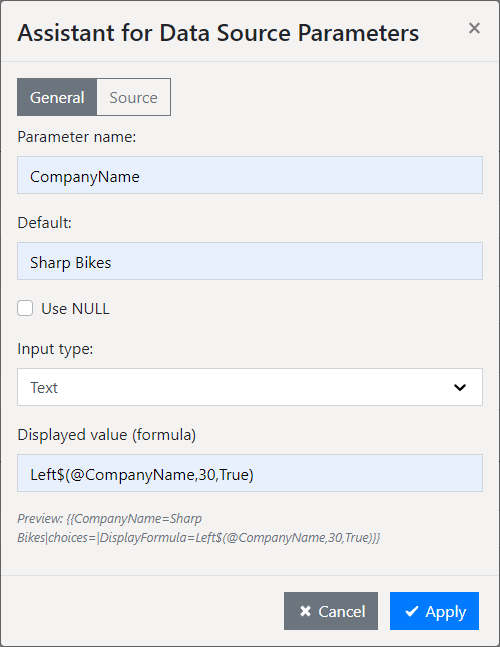
5. A wizard is also available for the definition of the data source parameters. For JSON and REST, start the wizard using the "Syntax" button in the "Server URL" field.
▪ Note the two options "General" and "Source"
▪ 'Displayed value (formula)': A formula can be specified if a table or 'Predefined values' is selected for 'Source'. The parameter name is passed as '@parametername'. The specification is optional.
Figure 2.24: Report Parameter Assistant